
Bulk Clone Professional OAuth
Connecting Another Jira Site (Cross-Site Clone) — User Guide Overview Bulk Clone Pro can clone Work Items into another Jira Cloud site, not just the one it is installed on. Before you can do that, an administrator connects the destination site once from the Connected Sites screen and authorizes access using OAuth — the same secure “Sign in with Atlassian” style consent you already use across Atlassian products. You never type or store a password or API token. Authorization happens entirely through Atlassian’s own login and...
read moreBulk Clone Professional Cloud – Video Tutorials
On this page we have gathered all our Video Tutorials for you to get fast productive with Bulk Clone Use Cases for Bulk Cloning Operations Introduction Overall Introduction Setup & Configuration Schedule Bulk Clone Jobs Setting up a remote connection 2. Setting up Bulk Clone with a Workflow Post Function 3. Usage of Smart Templates Everyday Cloning scenarios & feature capabilites Bulk Clone from multiple source projects into a merged target project 3. Bulk Clone Hierarchies of work items – Epics...
read moreBulk Clone Cloud – Bulk delete of clone logs
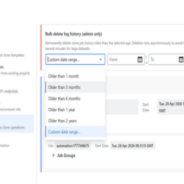
Context The “Log” tab in **Bulk Clone Settings** lists every clone job that has ever run in your Jira site, grouped by month. Over time this list can grow large. Jira administrators have an extra **Bulk delete log history** panel at the top of the Log tab that lets them delete many job logs at once, in the background. This feature only deletes the **clone job history records** (the entries you see on the Log tab). It does **not** delete any cloned Jira issues, comments, or attachments. Who Can Use It The bulk delete panel...
read moreRelease Notes – Bulk Clone Professional Cloud
Below you can view a full history of Release Notes for Bulk Clone Professional Cloud 2026-09-18 – Version 6.0 Bulk Clone into other Jira sites — Advanced edition (not available in Atlassian Government Cloud Versions) Cross-site cloning. Clone into another Jira Cloud site. Subtasks, attachments, comments, links and people come along, and original and clone link to each other. No API tokens. Add a site, click Authorize, approve the Atlassian consent. No passwords stored, revoke access anytime. Shared connections. An admin sets up the...
read moreBulk Clone Templates — User Guide
Overview Templates save your entire Bulk Clone configuration so you can reuse it later — from the UI or via Jira Automation rules. A template captures all your clone options, project/issue type mappings, field values, and prefix/suffix settings. Creating a Template Go to Filters > Search for work items > Apps (top right) > Bulk Clone to open the Bulk Clone form. Configure your clone settings: – Select source issues via JQL – Set target project and issue type mappings – Enable/disable options (subtasks, attachments,...
read moreScheduler Automation with Bulk Clone for Jira Cloud
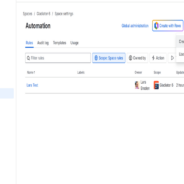
Jira Automation — User Guide Overview Bulk Clone Pro can be used as an action inside Jira Automation rules. This lets you automatically clone Work Items when certain conditions are met — for example, cloning a set of template issues every time a new Epic is created, or on a scheduled basis. Prerequisites A saved Bulk Clone template — to create one, go to Filters > Search for work items > Apps (top right) > Bulk Clone, configure your clone settings (target mappings, options, field values), then click Save as Template and choose a name...
read moreClone Spaces in Bulk Clone Cloud
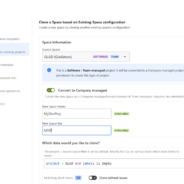
Clone Space — Feature Documentation Overview The Clone Space section allows you to create a new Jira project by cloning an existing project’s configuration and (optionally) its issues. It supports company-managed, team-managed, and service management projects. 1. Space Information Source Space A dropdown to select the existing Jira project to clone from. Each project is labeled with its type (Software, Business, Service Management) and management model (Company-managed, Team-managed). Selecting a source...
read moreBulk Clone Professional for Cloud Migration Plan
Migration Support to move to Bulk Clone Professional for Cloud Q1. Pre-Migration Requirements to move to Bulk Clone Professional for Cloud – are there any specific steps or configurations we need to perform before initiating the migration? A1. It is useful to go through the Jira Cloud migration assistant. Apart from that, Bulk Clone Professional for DataCenter does not store any meta data that needs to be carried over. You just install the Bulk Clone Professional Cloud APP and start importing the Jira projects you want...
read moreSecurity Policy for LB Consulting Group AB
Security Policy Purpose and Scope The purpose of this policy is to ensure the Confidentiality, Integrity, and Availability (CIA) of information managed within LB Consulting Group AB. This policy applies to all employees, contractors, and the purpose is to ensure and safeguard the information belonging to LB Consulting Group AB in a secure environment. This policy covers: All employees of LB Consulting Group AB who work with documents or information that concerns customers, suppliers or any other partner for whom the orgranisation has...
read moreBulk Clone Professional for Jira Cloud has arrived

The wait is over…, Bulk Clone Professional for Jira Cloud is here. Hi Jira Users; Back in 2015 when we launched our first Bulk Clone release for the Jira Server platform we got tremendous positive feedback for Bulk Clone APP, this was one of the core gaps that we were able fill, A lot has happened since then and we launched a scaled version for the Data Center platform and in parallel started to work on a cloud offering. It’s taken a while, but I promise you it is worth the wait, we wanted to launch a cloud product which is not...
read more
We offer professional services within Software Management, Enterprise Agility, Process Engineering, & Tooling. We also offer commercial IT add-ons for Workflow Management Products

We have extensive worldwide experience in countries such as United Kingdom, Germany, United States, France, Sweden, Denmark and others