
Bulk Clone Proffessional for Cloud Migration Plan
Migration Support to move to Bulk Clone Professional for Cloud Q1. Pre-Migration Requirements to move to Bulk Clone Professional for Cloud – are there any specific steps or configurations we need to perform before initiating the migration? A1. It is useful to go through the Jira Cloud migration assistant. Apart from that, Bulk Clone Professional for DataCenter does not store any meta data that needs to be carried over. You just install the Bulk Clone Professional Cloud APP and start importing the Jira projects you want to carry over from Jira Data Center, the same is...
Read MoreSecurity Policy for LB Consulting Group AB
Security Policy Purpose and Scope The purpose of this policy is to ensure the Confidentiality, Integrity, and Availability (CIA) of information managed within LB Consulting Group AB. This policy applies to all employees, contractors, and the purpose is to ensure and safeguard the information belonging to LB Consulting Group AB in a secure environment. This policy covers: All employees of LB Consulting Group AB who work with documents or information that concerns customers, suppliers or any other partner for whom the orgranisation has collected information in the normal course of its...
Read MoreBulk Clone Professional for Jira Cloud has arrived

The wait is over…, Bulk Clone Professional for Jira Cloud is here. Hi Jira Users; Back in 2015 when we launched our first Bulk Clone release for the Jira Server platform we got tremendous positive feedback for Bulk Clone APP, this was one of the core gaps that we were able fill, A lot has happened since then and we launched a scaled version for the Data Center platform and in parallel started to work on a cloud offering. It’s taken a while, but I promise you it is worth the wait, we wanted to launch a cloud product which is not only as good as our data center platforms, but even...
Read MoreBulk Clone Proffessional for Cloud Solution
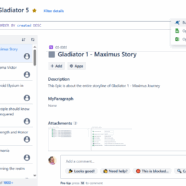
Hi and Welcome to the documentation of Bulk Clone Professional Cloud for Jira On the following pages we will guide you through the setup and usage of this plugin, and you will see how easy it is to get started and how intuitive the plugin is to use. The documentation contains of the following chapters; Installation of the plugin Setup of the plugin Usage of the plugin If you have support questions drop us a note here Check Release Notes on Atlassian Marketplace for specifics. Installation of the Plugin Log into your JIRA instance as an admin. Click the admin dropdown and...
Read MoreBulk Clone Professional 5.1 Released on Atlassian Marketplace
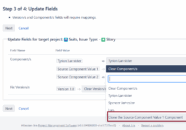
Dear Bulk Clone users; In this version we have added 2 new very useful features; When cloning a set of source issues with associated component values that does not exist in the target project(s), you can now optionally clone/add these component values in the cloning operation itself. Proceed as follows; Enable the “System Field” checkbox Choose “Components” field from the drop-down Once In the “target drop-down” dialogue for substituting components, choose “Clone the… “, to clone/add the source component to the target project issues. On...
Read MoreOrganizations – Jumpstart 2020 with me on new SAFe 5.0 Training offerings
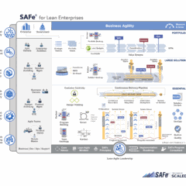
SAFe 5.0 goes live the 7:th of January 2020 and with it also our company internal course offerings. Contact me today for the new SAFe 5.0 Training´s for your own organisation which includes; Scaled Agile Framework 5.0 Leading SAFe 5.0 SAFe Lean Portfolio Management 5.0 SAFe for Architects 5.0 SAFe Agile Product and Solution Management 5.0 SAFe Product Owner/Product Manager 5.0 SAFe SCRUM Master 5.0 (SSM) SAFe Advanced SCRUM Master 5.0 (SASM) SAFe DevOPS 5.0 SAFe for Teams 5.0 ...
Read More
We offer professional services within Software Management, Enterprise Agility, Process Engineering, & Tooling. We also offer commercial IT add-ons for Workflow Management Products

We have extensive worldwide experience in countries such as United Kingdom, Germany, United States, France, Sweden, Denmark and others